
The AirTouch Home console dashboard is your main control screen for managing your air conditioning system, zones and other integrated devices. 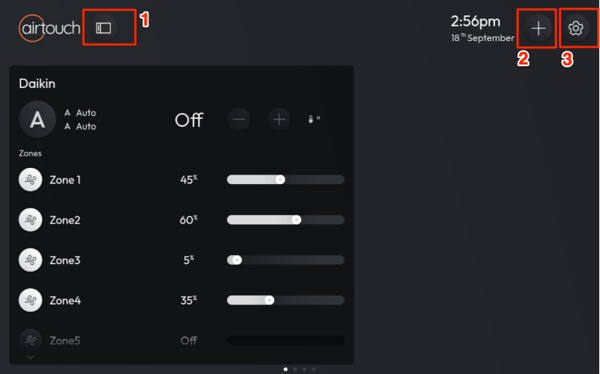
- Navigation Menu - The menu provides quick access to the following sections:
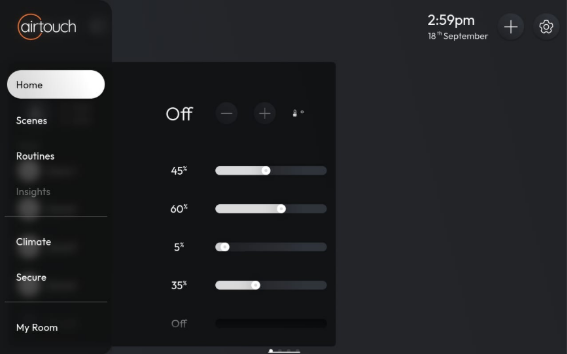
- Home – Returns you to the main dashboard view.
- Scenes – Access or activate pre-configured scenes to control multiple devices and settings with a single tap.
- Routines – Manage automated routines (e.g., “Wake Up,” “Away Mode”) for your home.
- Insights – View energy usage statistics and system performance reports. **Future Release**
- Climate – Access and manage climate control devices, such as Zone, AirTouch Beam, sensor, etc.
- Secure – Access and manage AirTouch Secure devices.
- List of Room – View or manage devices in the respective room.
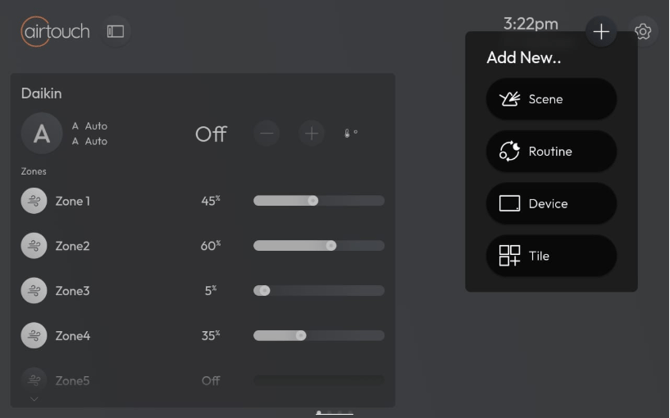
- Plus (+) Icon – Quickly add new Scene, Routine, Device, and Tile.
- Settings – The Settings menu contains the following sections.
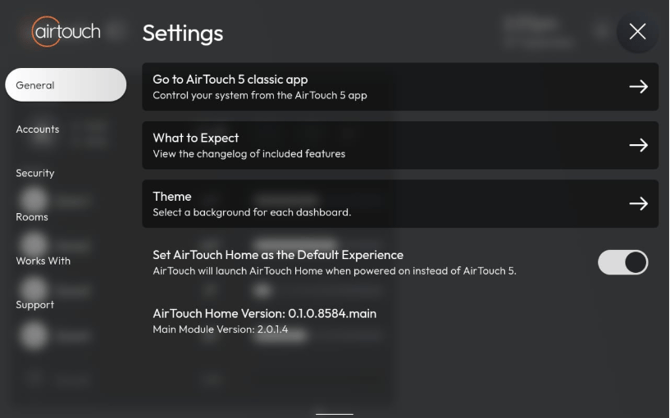
- General - Manage core system settings and display preferences.
- Accounts - Displays the mobile app user currently connected to the console.
- Security - Access and manage your AirTouch Secure devices.
- Rooms - View and manage all rooms configured in your AirTouch Home.
- Work With - View a list of devices and brands compatible with AirTouch Home.
- Support – Access help and support resources.